What is Pictory?
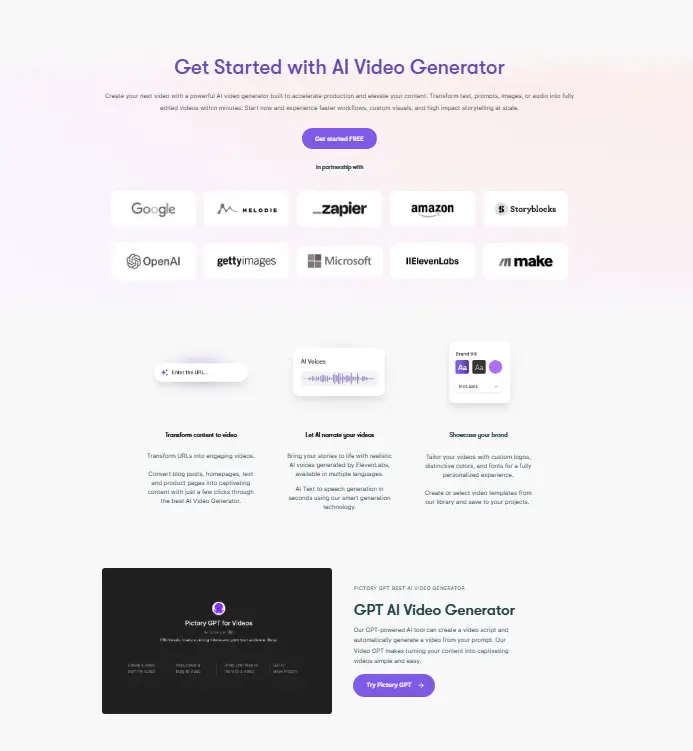
Pictory is an AI video generator that removes the complexity from video creation. Users provide text, and Pictory does the rest. It finds matching stock footage. It adds AI voiceover narration. It inserts captions and background music. The AI video tool produces a complete, polished video ready for sharing. Users can also edit videos by modifying text. The tool transcribes the video. Users edit the transcript, and Pictory updates the video automatically. No timeline editing. No complex software. Perfect for content marketers, social media influencers, small business owners, and educators, who can use the tools for creating professional videos without technical skills or expensive software.
Specifications
| Category | Details |
| Primary Functions | Converts scripts, blog posts, URLs, and long-form recordings into branded videos automatically. |
| Key Technology | - Natural language processing analyzes text and selects matching stock visuals automatically.
- AI scene summarization identifies key sentences from articles and URLs to build video storyboards.
- ElevenLabs hyper-realistic AI voices on Professional and Teams plans.
- Automatic transcription and caption generation with high accuracy. PowerPoint to video conversion.
|
| Integrations | - Dropbox and Google Drive for cloud storage.
- Social media direct publishing to YouTube, Facebook, Instagram, TikTok, LinkedIn, and X.
- API access for developers and enterprises to automate video creation at scale. SOC 2 compliant infrastructure.
|
| Special Features | Text-Based Video Editing |
| Pricing | Paid |
| Free Trial | Available |
Key Features
Text-to-Video Conversion: Users paste a blog post, article, or script. Pictory analyzes the text, selects relevant stock footage, adds AI voiceover, and generates a complete video.
Scripted Video Editing: The tool transcribes video content. Users edit the text transcript. Pictory cuts, rearranges, and updates the video automatically based on text changes.
AI Voiceover Generation: Multiple AI voices with different accents and languages. Users customize voice mood and style to match their content.
Video Summarization: Pictory extracts key moments from long videos. It creates short, engaging highlight clips for social media platforms.
Stock Media Library: Access to millions of stock video clips, images, and music tracks. Storyblocks integration provides professional assets.
Brand Customization: Users add logos, brand colors, and fonts. Videos maintain consistent brand identity across all content.
Social Media Optimization: Videos export in correct formats and aspect ratios for YouTube, Instagram, Facebook, LinkedIn, and TikTok.
Pros
✅ Turns text into complete videos automatically
✅ Edit videos by modifying text, not timeline tracks
✅ No prior video editing experience required
✅ Access to millions of stock clips and music
✅ AI voiceover with multiple language options
✅ Summarizes long videos into short highlights
Cons
❌ Requires stable internet connection for all features
❌ Automated editing offers less creative control than manual editing
❌ AI voices lack emotional depth of human narrators
❌ Free tier has usage limitations
Who is Using Pictory?
Content Marketers: They produce promotional videos quickly. Pictory turns blog posts into video content for multiple platforms.
Social Media Influencers: They create regular video content to engage followers. Pictory saves time on editing and production.
Small Business Owners: They produce cost-effective video advertisements and informational content without hiring editors.
Educational Institutions: They enhance online learning materials with easily created video content. Teachers convert lessons into engaging videos.
Bloggers and Writers: They convert articles into video blogs. Pictory expands their content reach to video platforms.
Non-Profit Organizations: They create impactful storytelling videos for campaigns. Pictory makes professional video accessible on limited budgets.
Pricing
Starter ($25/ month): Includes 200 video minutes, 2 million Storyblocks stock assets, 34 AI voices, 5,000 music tracks, and 1 brand kit. Suited for individual creators with a moderate content output.
Professional (($47/ month): Includes 600 video minutes, 12 million stock assets from Getty Images and Storyblocks, 51 ElevenLabs hyper-realistic voices, 10,000 music tracks, 5 brand kits, and 29-language support. The right tier for professional
Teams (($119/ month): Supports 3 users, 1,800 video minutes, 10 brand kits, 240 minutes of ElevenLabs voices, a shared team workspace, and professional onboarding.
What Makes Pictory Unique?
- Edit videos by changing the transcript. No timeline dragging required.
- Turn any blog post or article into a complete video automatically.
- Text edits reflect in the video preview instantly.
- Pull key moments from long videos to make short social clips.
- Access millions of stock clips and music tracks from Storyblocks.
- Anyone can make professional videos, even with zero editing experience.
Rating
| Category | Rating (⭐/5) |
| Ease of Use | 4.8 /5 |
| Cost Efficiency | 4.7 /5 |
| Accuracy and Reliability | 4.5 /5 |
| Performance and Speed | 4.7 /5 |
| Functionality and Features | 4.6 /5 |
| Customization and Flexibility | 4.3 /5 |
| Data Privacy and Security | 4.5 /5 |
| Support and Resources | 4.4 /5 |
| Integration Capabilities | 4.2 /5 |
| Overall Score | 4.5 /5 |
Summary
Pictory AI earns its position as one of the most accessible and cost-effective video creation platforms for content marketers, bloggers, YouTubers, and small business teams. The text-based video editing feature alone represents a genuine workflow innovation, and the article to video and URL to video tools give every piece of written content a second life as a shareable video without additional production time. For teams focused on speed, content repurposing, and scalable video production without technical complexity, Pictory delivers a genuinely practical and cost-saving solution.
Disclaimer
The pricing and other information related to Pictory AI may not be up to date. We recommend users refer to the official website of Pictory AI for the most accurate specifications and current pricing details.