What is Animoto?
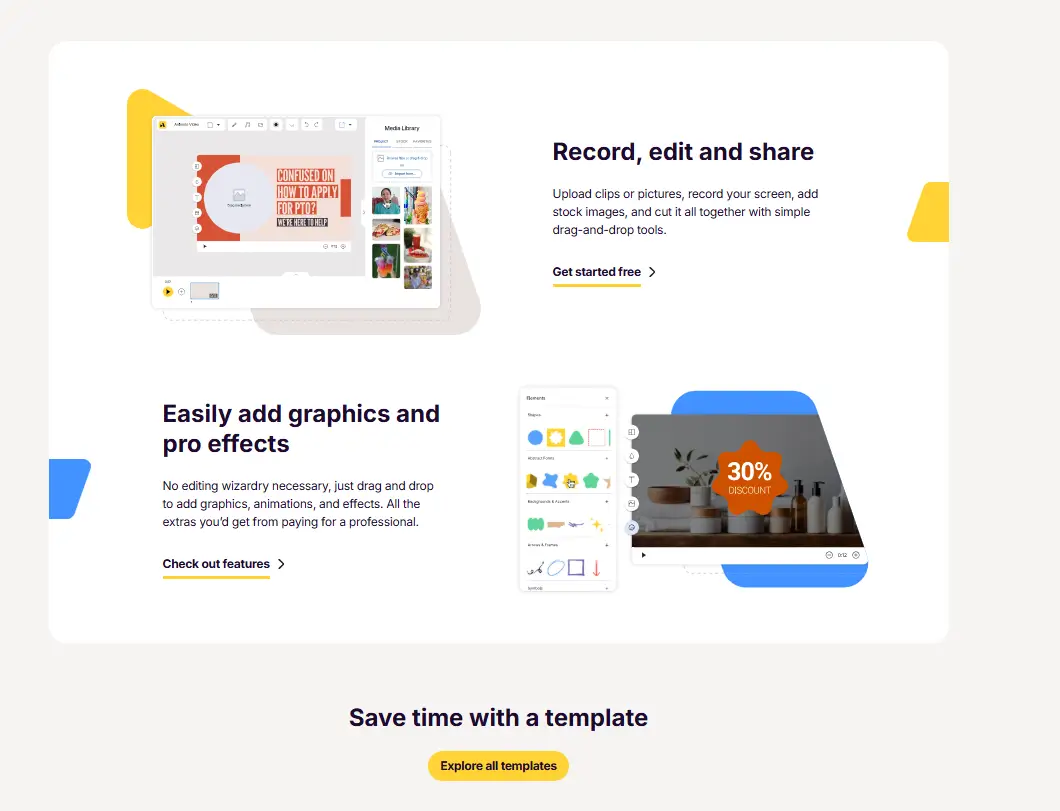
Animoto helps users create professional videos without editing skills. You upload photos or clips, choose a style, and the platform builds a video in minutes. Businesses, marketers, and creators use it to produce social media videos, ads, and presentations quickly. The AI video tool removes the stress of complicated video editing tools. With ready templates and drag-and-drop tools, users focus on storytelling instead of technical work.
Specifications
| Category | Details |
| Primary Functions | AI-powered video creation platform for marketing and social media content |
| Key Technology | - Cloud-based video rendering engine
- Template automation system
- AI-assisted video layout generation
|
| Integrations | Works with stock media libraries, social media platforms, and cloud storage services |
| Special Features | - Drag-and-drop video builder
- Ready-made templates
- Licensed music library
- Branding tools
|
| Pricing | Freemium model |
| Free Trial | Available |
Key Features
Drag-and-Drop Video Builder: Animoto offers a simple drag-and-drop builder that allows users to create videos quickly. Users upload photos, videos, or text blocks and arrange them easily. The platform automatically adjusts layout and timing to create a smooth final video. This feature helps beginners create professional videos without learning complex editing software.
Ready-Made Templates: Animoto includes a large collection of templates designed for marketing, social media, product promotions, and personal use. Users select a template that matches their goal and customize it with their content. Templates save time and help users maintain consistent branding across campaigns.
Licensed Music Library: Animoto provides access to a built-in music library. Users can choose tracks that match the tone of their videos. This removes the need to search for copyright-free music elsewhere. Music selection plays a big role in improving engagement and viewer interest.
Branding and Customization Tools: Animoto allows businesses to add logos, brand colors, and fonts to their videos. Users create consistent visual identity across all content. This makes marketing videos look more professional and recognizable. Branding tools help businesses build trust and maintain a clear brand image.
Social Media Optimization: Animoto designs videos that fit different social media platforms. Users create square, vertical, or landscape videos depending on where they plan to share them. This ensures videos look good across channels like Facebook, Instagram, and YouTube.
Pros
✅ No editing experience required. Drag, drop, and done.
✅ Huge built-in stock library reduces external costs.
✅ Brand kits keep videos consistent at scale.
✅ Team workspaces support collaborative production.
✅ Social-ready formats for marketing and ads.
✅ Free tier to test before upgrading.
Cons
❌ Template-driven look limits creative control.
❌ Free tier includes watermarks on exports.
❌ Some users report billing and support issues.
❌ Advanced editors may find customization lacking.
Who is Using Animoto?
Marketing Teams: Marketing professionals use Animoto to create promotional videos, advertisements, and campaign visuals. The platform helps them launch content faster and maintain consistent branding.
Small Business Owners: Small businesses rely on Animoto to create product videos and customer promotions. It allows them to produce marketing materials without hiring professional editors.
Social Media Managers: Social media managers use Animoto to create engaging short videos. The ready templates help them maintain posting schedules without delays.
Content Creators: Creators use Animoto to produce storytelling videos and visual content. It allows them to share ideas quickly without complex editing steps.
Educators and Trainers: Teachers and trainers use Animoto to create educational videos and presentations. Visual storytelling improves engagement and learning outcomes.
Pricing
Free Plan: Animoto AI offers a free version that allows users to create basic videos with limited features. This plan works well for beginners testing the platform.
Basic Plan: The Basic plan provides access to more templates and customization tools. Users create higher-quality videos without major restrictions.
Professional Plan: Professional plans unlock advanced branding tools and higher-resolution exports. Businesses use this plan for marketing campaigns and client work.
Team Plan: Team plans support collaboration features. Multiple users work together on projects and maintain shared brand assets.
What Makes Animoto Unique?
- Offers ready-made templates designed for marketing and social media
- Allows users to create videos without professional editing skills
- Provides licensed music library for safe and legal usage
- Supports branding tools like logos, fonts, and colors
- Optimizes videos for multiple social media formats
- Works fully online without requiring software installation
- Helps businesses create marketing videos faster
Rating
| Category | | Rating (⭐/5) |
| Ease of Use | | 4.7 /5 |
| Cost Efficiency | | 4.4 /5 |
| Accuracy and Reliability | | 4.5 /5 |
| Performance and Speed | | 4.6 /5 |
| Functionality and Features | | 4.5 /5 |
| Customization and Flexibility | | 4.2 /5 |
| Data Privacy and Security | | 4.4 /5 |
| Support and Resources | | 4.5 /5 |
| Integration Capabilities | | 4.3 /5 |
| Overall Score | | 4.5 /5 |
Summary
Animoto makes video creation simple and accessible for users who want professional results without technical skills. The platform offers templates, music, and branding tools that help businesses create marketing content quickly. Its drag-and-drop builder saves time and removes the stress of complex editing software. While experienced editors may want more advanced features, Animoto remains a strong choice for beginners, marketers, and small businesses looking to produce engaging video content regularly.
Disclaimer
This review reflects Animoto AI features and pricing available at the time of writing. Visit the official Animoto website to confirm the latest updates before choosing a plan.