What is GPTExcel AI?
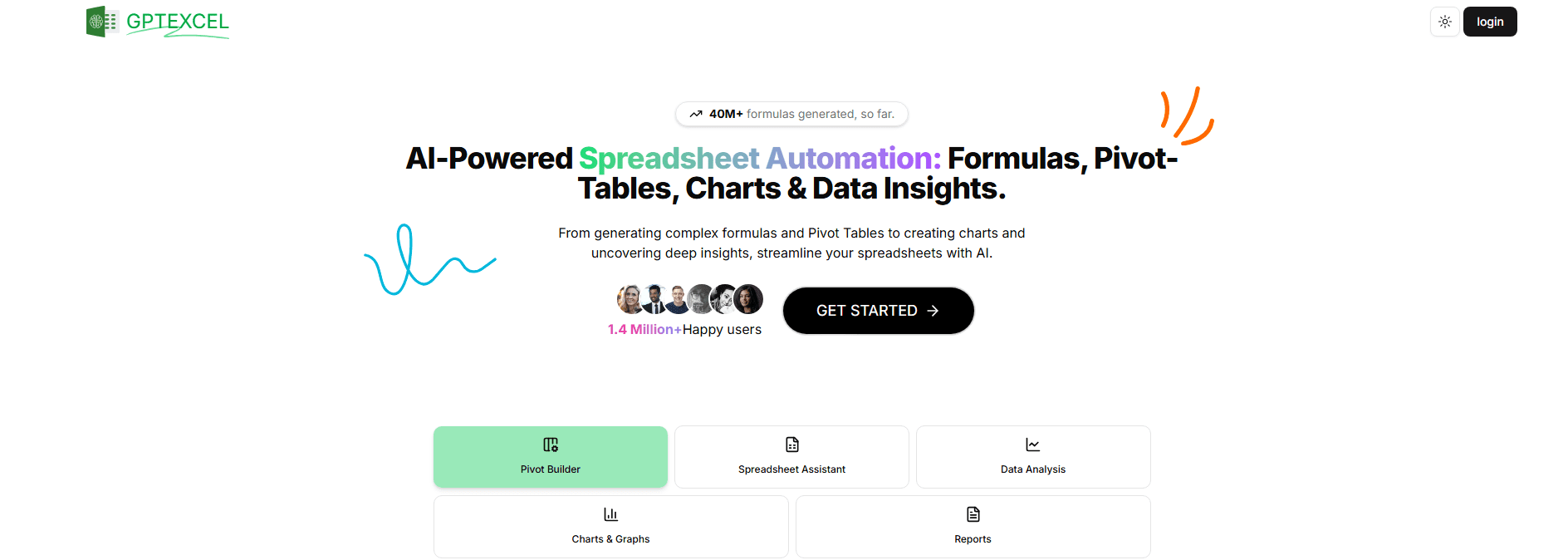
GPTExcel is an AI tool made for professionals using spreadsheets like Excel or Google Sheets. The primary job of the platform is to save your time. Instead of spending hours searching for the right form, tell GPTExcel what you need. The platform will write the correct formula, script or SQL for each of your query. The platform also explains the working of the code, helping users with the learning. With a support of over 50 languages, both novice and experienced professionals worldwide can use GPTExcel and boost their productivity.
Specifications
| Category | Details |
| Primary Functions | AI-powered assistant generating formulas for spreadsheets |
| Key Technology | - AI formula generation algorithms
- script automation engine (VBA, Apps Scripts, Airtable Scripts)
- SQL query builder and debugger
- Regex pattern generator
- Template creation system
- Multilingual natural language processing supporting 50+ languages
|
| Integrations | - Excel seamless compatibility
- Google Sheets full integration
- Airtable platform support
- Cloud storage service synchronization
- Cross-platform accessibility (Windows, Mac, web)
- API access for custom implementations
|
| Special Feature | - Intuitive design for all skill levels
- Comprehensive guides from basic to advanced
|
| Pricing | Requires Pro plan |
| Free Trial | Available |
Key Features
Formula Generator: As the main feature, GPTExcel writes the Excel and Google Sheets formula. The platform also describes your calculations in simple conversational English.
Script Generator: GPTExcel automates tasks by writing codes like VBA for Excel, Google Apps Script for Sheets and scripts for Airtable.
SQL and Regex Helper: With GPTExcel, professionals can create and fix SQL queries for databases. Users can also use the platform for writing regular expressions (regex) or finding text patterns.
Template Creator: Professionals sue GPTExcel for building easy-to-use table templates and organize data from the start.
Pros
✅ Reduces time for creating formulas, writing scripts and other spreadsheet tasks.
✅GPTExcel comes with an intuitive interface making it easy to use for all level users.
✅ Supports 50+ languages, ensuring accessibility for diverse users.
✅ Users can explore the GPTExcel’ features without any fees.
Cons
❌ Limited free requests of up to four.
❌ New users need more time to understand GPTExcel’s features.
❌ Access to a full suite of automation comes with a paid plan.
Who is Using GPTExcel AI?
Accountants and Financial Analysts: These professionals are using GPTExcel for building financial models and creating complex reports faster.
Data Analysts: Professionals are using the power of AI for generating and troubleshooting SQL queries and data manipulation.
Project Managers: Managers use GPTExcel for organizing team tasks, timelines and data in templates.
Students and Educators: Teachers and students are incorporating GPTExcel into coursework for teaching spreadsheet and data management skills.
Others: Non-profit organizations, fitness trainers, and legal professionals are using the power of GPTExcel for various specialized tasks like tracking donations, planning workouts and organizing legal documents.
Pricing
Free Plan: Users can access all the basic features of GPTExcel with a limit of four request a day without any cost.
Pro Plan ($6.99/ month): Users can access the advanced features of GPTExcel, including script generation and priority customer support.
What Makes GPTExcel AI Unique?
- Power AI capabilities that not only generates but also explain formulas, scripts and other elements.
- Serves as a productivity tool and an educational resource.
- Multilingual support and generous free tier makes GPTExcel accessible to a wide range of audience across diverse regions and skills.
- GPTExcel offers an API for custom integrations and extended functionality.
- Availability of comprehensive tutorials and guides on GPTExcel website covering everything from basic setup to advanced features.
Rating
| Category | Rating (⭐/5) |
| Ease of Use | 4.2 /5 |
| Cost Efficiency | 4.6 /5 |
| Accuracy and Reliability | 4.5 /5 |
| Performance and Speed | 4.3 /5 |
| Functionality and Features | 4.7 /5 |
| Customization and Flexibility | 4 /5 |
| Data Privacy and Security | 4.4 /5 |
| Support and Resources | 4.1 /5 |
| Integration Capabilities | 4.3/5 |
| Overall Score | 4.3 /5 |
Summary
GPTExcel AI stands as an all-in-one solution for professionals working with spreadsheets, empowering them with AI-driven tools to streamline their workflows and boost productivity. The combination of the powerful features, accessibility and ease of use makes GPTExcel a valuable asset for a wide range of users across various industries and sectors.
Disclaimer
The review contains the recent capabilities of GPTExcel AI. With further development of the platform, the pricing and other features are subject to change. We recommend users to check the pricing details and features on the before any financial commitment.