What is Speechify?
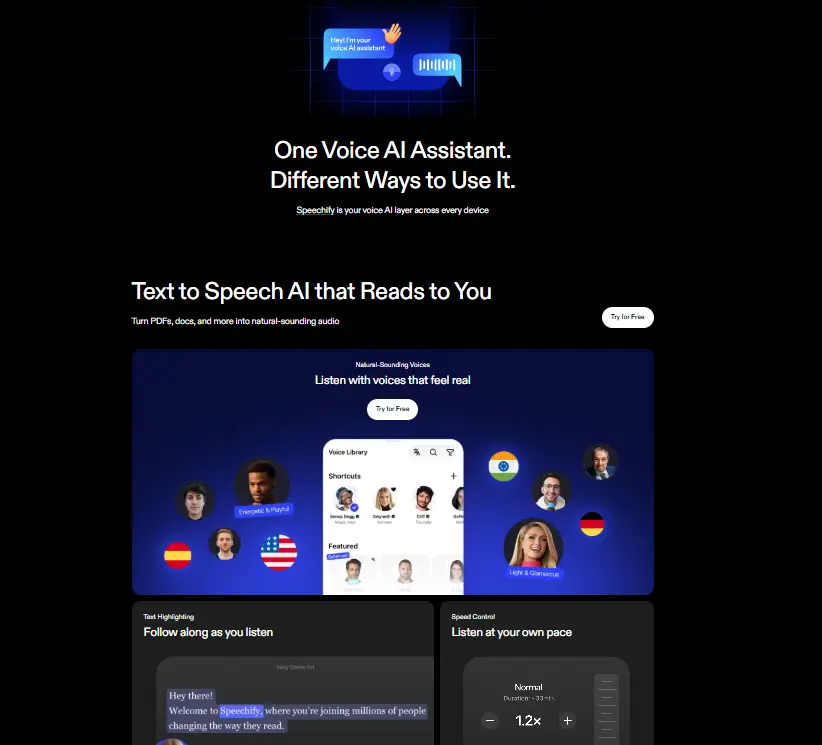
Speechify is an AI text-to-speech app that reads written content aloud. Users import documents, articles, PDFs, or emails. Speechify converts them into spoken audio using natural sounding voices. With over 200 voices across 60 languages, users adjust reading speed up to three times faster than normal. They can clone voices, add emotional tone, and control pronunciation. Speechify works on iPhones, Android phones, computers, and as a browser extension. It syncs across devices automatically. This AI audio tool helps students study more effectively. Perfectr for people with dyslexia, ADHD, or visual impairments access written content. Speechify offers a free tier and a premium subscription with advanced features.
Specifications
| Category | Details |
| Primary Functions | Converts text, documents, and images into natural sounding speech; supports reading across web pages, PDFs, emails, and scanned content. |
| Key Technology | - AI-powered text-to-speech engine with natural voice generation.
- OCR technology scans printed text into digital format.
- Voice cloning creates personalized voice outputs.
- Adjustable speed control improves listening flexibility.
|
| Integrations | - Mobile apps for iOS and Android.
- Browser extensions for Chrome, Safari, and Edge.
- Cloud syncing across devices.
- Supports imports from Google Docs, PDFs, and web pages.
|
| Special Features | - Voice Cloning
- OCR Text Scanning
- Adjustable Listening Speed
- Multi-device Sync
|
| Pricing | Paid |
| Free Trial | Available |
Key Features
Text to Speech Conversion: Speechify converts written content into spoken audio within seconds. Users paste text or upload files, and the tool reads the content clearly. This helps people finish reading tasks faster and reduces eye strain during long sessions.
Optical Character Recognition (OCR): Speechify scans printed books, notes, or documents using a camera. The tool converts images into readable text and then turns that text into audio. This feature makes printed material accessible without typing.
High Quality AI Voices: Speechify offers a wide selection of natural sounding voices. Users can choose voices based on language, accent, and tone. These voices sound smooth and easy to follow, even at faster playback speeds.
Adjustable Reading Speed: Users control how fast the text is read. Some listen at normal speed, while others increase playback speed to finish large documents quickly. This flexibility helps improve productivity and learning speed.
Voice Cloning: Speechify allows users to create custom voices that match their preferred speaking style. Content creators use this feature to produce voiceovers without recording manually.
Multi Device Syncing: Speechify syncs files across devices automatically. Users can begin listening on a laptop and continue later on a phone without restarting the document.
Pros
✅ Natural sounding voices improve listening comfort
✅ Works across phones, tablets, and browsers
✅ OCR scanning reads printed material easily
✅ Adjustable speed helps finish content faster
✅ Voice cloning supports content creation
✅ Simple interface works well for beginners
Cons
❌ Premium features require paid subscription
❌ High-speed playback may take practice to understand
❌ Internet connection required for syncing
❌ Free plan includes limited voice options
Who is Using Speechify?
Students: They listen to textbooks, articles, and study materials. Speechify helps them absorb information while commuting or exercising.
Professionals: They listen to industry reports, emails, and documents during commutes. Speechify turns downtime into productive listening time.
People with Reading Disabilities: Users with dyslexia, ADHD, or visual impairments access written content through audio. Speechify changes how they experience reading.
Book Lovers: They listen to audiobooks and literature without physical books or e-readers. Speechify expands their reading options.
Language Learners: They improve pronunciation and listening skills by hearing native voices. Speechify supports multiple languages and accents.
Fitness Enthusiasts: They listen to content while working out. Speechify helps them stay informed without stopping their exercise routine.
Pricing
Free: Speechify offers a free version that includes basic voices and reading tools. Users can explore core features without paying upfront.
Premium: The Premium plan unlocks advanced voices, faster listening speeds, and voice customization tools. Pricing may vary depending on region and subscription terms. For the latest pricing details, users should check the official Speechify website.
What Makes Speechify Unique?
- Scans printed pages and reads them instantly
- Works across multiple devices without losing progress
- Offers realistic voices that sound natural
- Allows users to control listening speed easily
- Supports voice cloning for personalized audio
- Turns long reading sessions into simple listening tasks
Rating
| Category | Rating (⭐ /5) |
| Ease of Use | 4.5 /5 |
| Cost Efficiency | 4.6 /5 |
| Accuracy and Reliability | 4.8 /5 |
| Performance and Speed | 4.5 /5 |
| Functionality and Features | 4.7 /5 |
| Customization and Flexibility | 4.3 /5 |
| Data Privacy and Security | 4.9 /5 |
| Support and Resources | 4.5 /5 |
| Integration Capabilities | 4.2 /5 |
| Overall Score | 4.6 /5 |
Summary
Speechify makes reading faster and easier by turning text into clear spoken audio. OCR scanning, voice customization, adjustable speed, and multi-device syncing make it very practical. Students use it to revise faster, professionals use it to save time, and creators use it to produce voice content. It works well for anyone who wants to reduce reading time and stay productive.
Disclaimer
Speechify features and pricing may change over time. Always check the official Speechify website for the latest updates and plan details.