What is AutoCut AI?
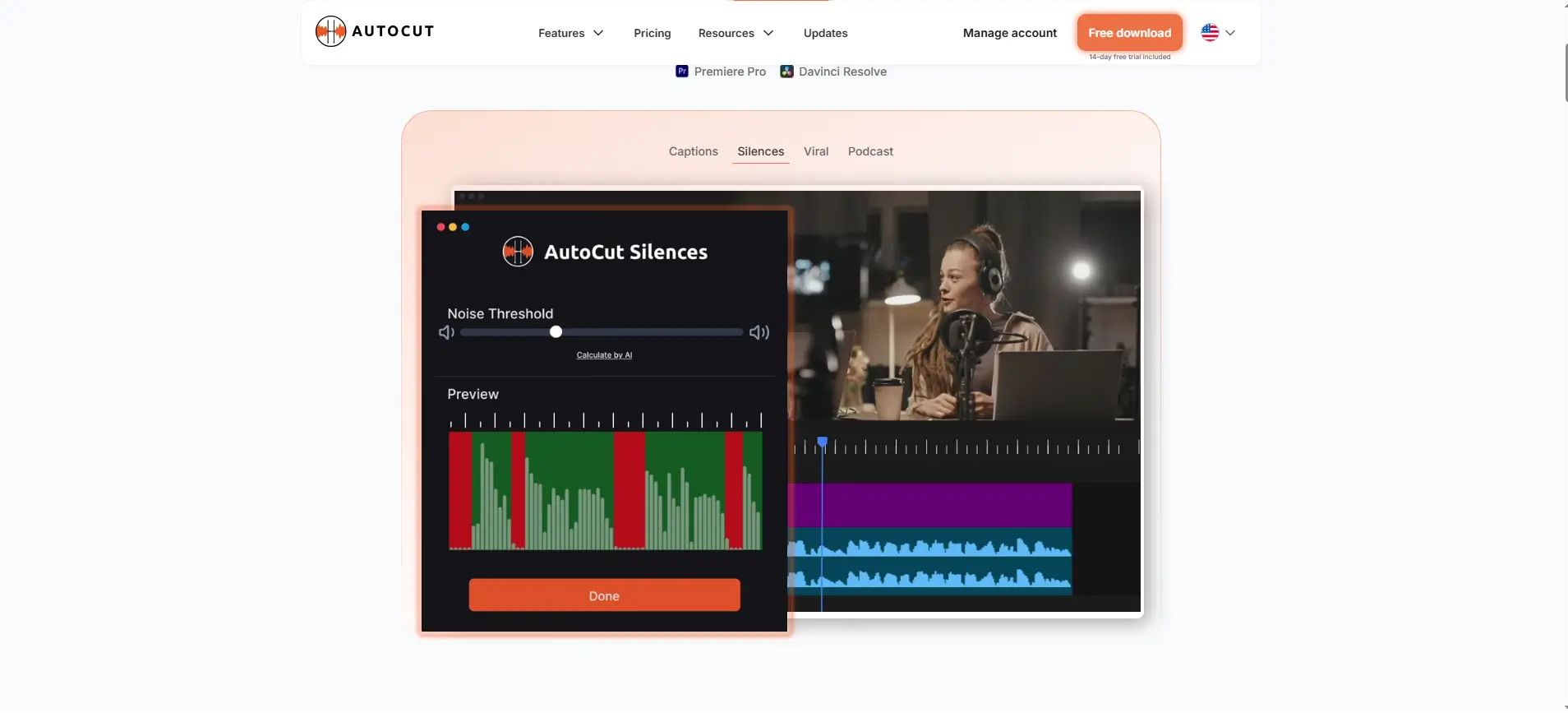
AutoCut AI is a smart plugin for Adobe Premier Pro, designed for automating most of its repetitive tasks related to video editing. The tool helps users remove the silences, integrating B-rolls and add animated captions. With the platform, professionals can save most of their time and enhance the quality of video content. AutoCut AI’s high scores of accuracy and functionality helps content creators, video editors and podcast producers streamline their workflows while preserving their creativity and quality.
Specifications
| Category | Details |
| Primary Functions | AI-powered plugin automating repetitive video editing tasks |
| Key Technology | - Advanced silence detection algorithms
- Speech recognition for caption synchronization
- Natural language processing for transcription accuracy
- AI-powered zoom automation, intelligent b-roll matching
- Dynamic transition generation, audio waveform analysis
|
| Integrations | - Native Adobe Premiere Pro plugin architecture
- Seamless timeline integration
- Non-destructive editing workflow preservation
- Adobe Creative Cloud compatibility
- Continuous version updates matching Premiere Pro releases
|
| Special Features | - Sophisticated audio analysis detecting and eliminating unwanted noise
- One-click animated subtitle generation with automatic speech-to-text transcription
- AI-driven dynamic zoom effects focusing viewer attention on subjects
- Intelligent footage library search and automated B-roll placement
- Intuitive plugin panel within Premiere Pro environment
|
| Pricing | Paid |
| Free Trial | Not available |
Key Features
Automatic Silence Remover: The tool identifies and removes the unwanted pauses, dead air segments, filler moments and other noises in podcasts and videos. Besides, the tool preserves natural speech rhythm and conversational flow, eliminating hours of manual timeline scrubbing and cutting without frame-by-frame editing.
Instant Podcast Editing: Designed specifically for podcast video production detects conversational silences, applies dynamic jumps cuts maintaining natural dialogue flow, inserts smooth transitions between segments and streamlines multi-speaker editing challenges. The tool converts hours of podcast post-production edits into minutes, enabling consistent publishing without further audio quality or professional polish.
Sophisticated AutoZoom: The AI-driven dynamic zoom effects automatically focus viewer attention on videos’ subjects, creating visual interest through camera movement simulation. It further adds professional production value, while maintaining engagement throughout the content without manual keyframes animation, motion tracking setup, or complex effect configuration.
Generates Animated Captions in One Click: AutoCut AI transforms speech into synchronized animated subtitles through advanced speech recognition technology, transcribing spoken words with high accuracy, timing captions to work-level precision. The accessibility enhances viewer engagement, accommodates sound-off viewing environments and improves content discoverability through searchable text without manual efforts of transcribing.
Seamless Integration of B-Rolls: The tool suggests users to insert relevant B-roll footage from their library at appropriate moments, enriching the visual storytelling without manual search.
Pros
✅ Automates routine tasks
✅ Creators can focus on creative aspects.
✅ Creates engaging and polished videos through animated captions and auto zooms.
✅ Intuitive design.
✅ Accessible for both novice and experienced editors.
✅ Regular updates and new features.
✅ Helps users meet the needs of modern video editors.
Cons
❌ Compatible only with Adobe Premier Pro
❌ High cost, making it difficult for freelancers and small studios.
Who is Using AutoCut?
Content Creators: Professionals leverage the power of the tool for removing silence in tight, engaging content, utilize one-click captions for accessibility and engagement, and accelerate publishing schedules through dramatic editing time reductions across vlogs, tutorials, reviews, and entertainment content.
Podcast Producers: Professionals can streamline client project workflows, eliminate tedious manual tasks, maintain professional quality standards through reliable automation and boost project capacity without expansion of the team size or sacrificing creative excellence.
Video Editors: These professionals are using the tool for streamlining post production workflows, especially for client projects, saving much time and money.
Marketing Agencies: Agencies are using the tool for business video production, create compelling campaign content, produce consistent brand messaging across multiple platforms, generate accessible social media videos, and maximize content output without proportional budget increases.
Pricing
Basic: At a price of $6.60/ month or $79 billed annually, users can access the core features like AutoCut silences v2 and AutoCaptions.
AI Plan: At a price of $14.90/ month or $178.80 billed annually, users can access all the advanced features of AutoCut AI.
What Makes AutoCut Unique?
- The key features enhances quality and efficiency.
- Streamlines the workflows of video editors.
- Integrated for seamless editing.
- Uses advanced AI for AutoZoom and AutoResize.
- Offers detailed tutorials on its website and YouTube.
- Offers continuous software update, making it compatible with the latest versions of Premiere Pro.
Rating
| Category | Rating (⭐/5) |
| Ease of Use | 4.5 /5 |
| Cost Efficiency | 4.2 /5 |
| Accuracy and Reliability | 4.8 /5 |
| Performance and Speed | 4.6 /5 |
| Functionality and Features | 4.7 /5 |
| Customization and Flexibility | 4.4 /5 |
| Data Privacy and Security | 4.5 /5 |
| Support and Resources | 4.3 /5 |
| Integration Capabilities | 4 /5 |
| Overall Score | 4.5 /5 |
Summary
With sophisticated AI-powered effects, AutoCut AI revolutionizes video editing by automating the routine tasks. The platform allows creators to create compelling content. The suite of advanced features combined with the ease of use and constant innovation, makes the tool a valuable asset for creative professionals. The ability to save time while enhancing the video quality makes it a must have tool for today’s video production.
Disclaimer
The pricing and other information related to AutoCut AI may not be up to date. We recommend users to refer to the official AutoCut website for accurate specifications and current pricing details.